OpenAI just gave businesses a way to claim their spot inside ChatGPT.
It's called Businesses in ChatGPT, and it launched in beta on November 10, 2026. If you own a business, someone is going to pitch you on it this week.
Here's my honest take before they do. It's worth a look. It's not a reason to change your plan. Let me walk you through what it is, who it's really built for, and what you should actually do about it.
OpenAI just let businesses claim their spot in ChatGPT
OpenAI says ChatGPT reaches 1.2 billion people every week. A lot of them are asking it who to hire, what to buy, and which option is better.
Until now, you had no say in how ChatGPT described your business. It pulled from your website, your reviews, your listings, and whatever else it could find. If it got something wrong, you had no direct way to fix it.
This launch changes that, a little. There are three pieces:
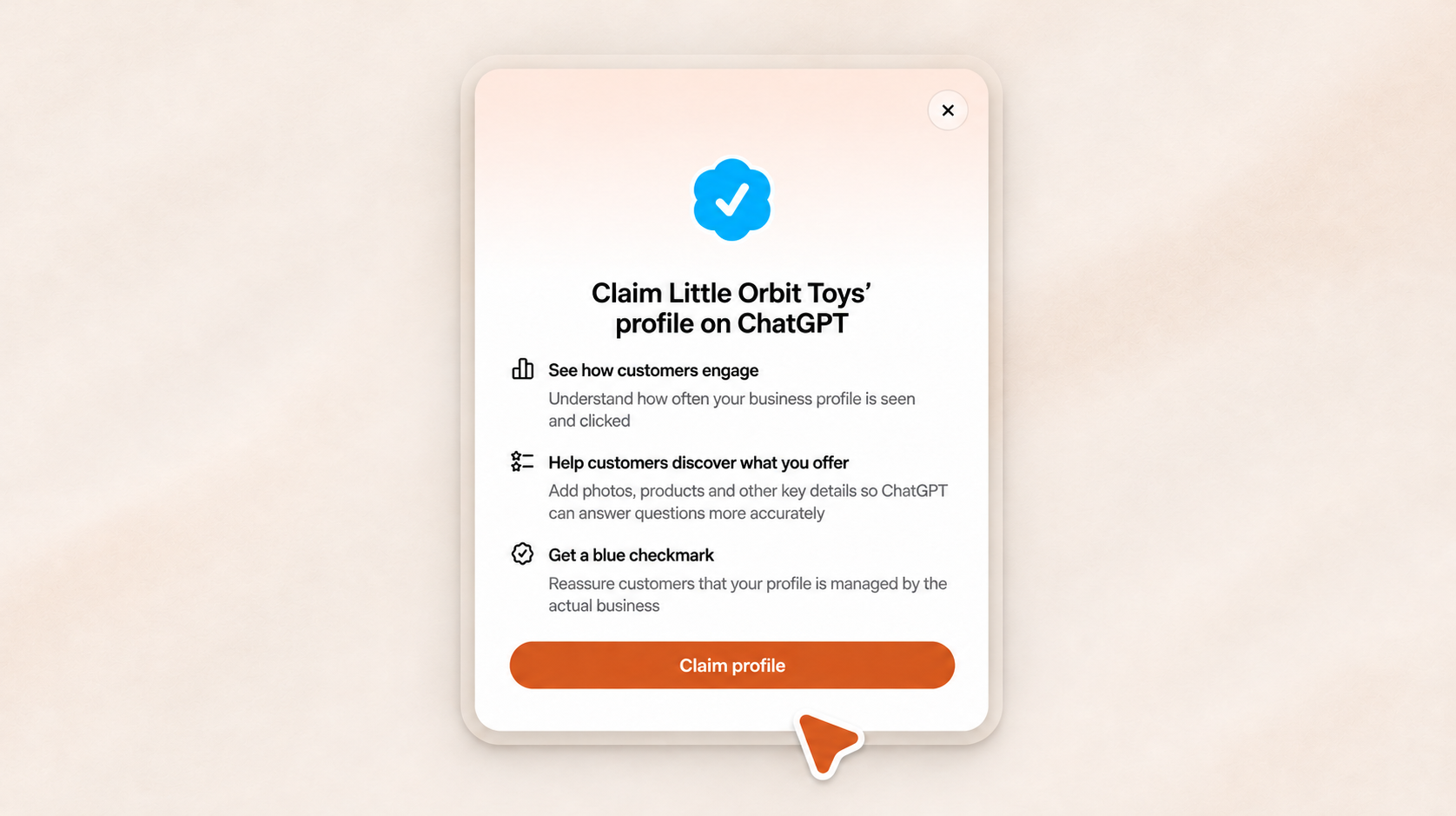
- Business Hub. Where you claim your business, update your details, and see some basic numbers.
- Business Agents. A chat inside ChatGPT that answers customer questions using information you provide.
- ChatGPT Ads. You can pay to send people to that agent.
Each piece applies to different businesses. That's the part a lot of the coverage skips.
The Business Hub is where you claim your business
Business Hub lives at chatgpt.com/business-hub and in the ChatGPT sidebar. It's free. OpenAI says eligible businesses with a website can claim a profile wherever ChatGPT is available.
Once you're verified, your profile gets a blue checkmark that tells customers the business itself is managing it, and you can add photos, products, and other key details.
There's a catch for local businesses. Local stores and restaurants can only claim a listing that already exists, and only in the U.S. If ChatGPT doesn't have a listing for you yet, there's nothing to claim.
Verification takes two steps
First, you prove your connection to the business. You can do that with a business phone number, a business email, a DNS record on your website, or by connecting a Shopify store.
Second, you complete an identity check through Persona, a verification service. Persona may ask for a government ID, your business registration details, and proof that you're authorized to represent the business.
Until that second step is approved, you can't publish changes, see your insights, or build an agent. If you're already an OpenAI Enterprise customer or advertiser, your OpenAI rep can walk you through it.
Claim it yourself and keep the keys
Whoever claims your business controls it. Make that someone inside your company, an authorized representative who'll still be around next year.
If an agency or marketer helps you set it up, that's fine. The login should still belong to you, the same way your Google Business Profile and your domain should. Owners lose access to their own accounts all the time because a vendor set things up and then walked away. Don't let that happen here.
You're responsible for what it says
OpenAI says your profile can include information from other sources, and it doesn't verify every detail you submit. You're on the hook for keeping your products or services, prices, and availability accurate.
So when your hours change, your prices go up, or you drop a service, update it. Same as you would anywhere else.
The numbers are a starting point, not a scoreboard
The Hub shows aggregated insights like mentions, profile views, website clicks, and discovery topics, which are the general themes that led people to you.
For a local business, a mention counts when ChatGPT shows a result for your location. For an online business, it counts when ChatGPT references your website.
You don't see consumer conversations or individual prompts. Data also only shows up after it clears a reporting threshold, so a smaller business may see very little at first.
That's useful. It's also limited. A mention count tells you that you showed up. It doesn't tell you exactly what people asked, who else came up, or why ChatGPT picked someone else.
Here's what the Hub won't show you
This is the gap to understand before anyone sells you on it.
From what OpenAI has shared, the Hub is about your business and only your business. Discovery topics give you general themes, not the exact questions. OpenAI also hasn't said it will show you how you compare to competitors.
Those are the questions that actually help you make decisions. Which questions am I showing up for? Which ones am I missing? Who's getting recommended instead of me, and what do they have that I don't?
That's where AI visibility tracking still earns its keep. At WFPulse, we use Rankability to track which prompts a business shows up for across ChatGPT and other AI platforms, and who shows up instead. The Hub tells you what happened. Tracking tells you where the openings are.
Use both. Just don't confuse a claimed profile with a strategy.
Business Agents are built for online businesses first
A Business Agent is a chat inside ChatGPT that answers customer questions using information you provide. Every business agent conversation is clearly labeled and kept separate from ChatGPT's own answers.
Right now, agents are only for eligible ecommerce and online service businesses in the U.S. Retailers can also add product feeds with current pricing and availability.
If you run a Shopify store, pay attention. You can connect your store from Business Hub or your Shopify admin, and eligible products already reach ChatGPT through Shopify Catalog. Customers can ask about your products, compare options, and get answers built on your own data.
If you run a plumbing company, a dental office, or a law firm, the agent probably isn't for you yet. OpenAI says it plans to expand to more markets and business categories. It hasn't said when.
If you qualify, treat the agent like a salesperson
Customers may make up their mind based on what your agent tells them before they ever visit your website or call you. Treat it like a new hire on the sales floor.
Give it real answers. "Ships in three to five business days" beats "fast shipping" every time, as long as it's true. Check your product information, prices, return policy, and stock before you publish, and check again whenever something changes.
The ads piece is a separate decision
You can sponsor your Business Agent and use it as the destination for ChatGPT Ads. Sponsored placements are labeled and kept separate from ChatGPT's organic answers.
So paying for an ad doesn't buy you a recommendation. It buys you a labeled placement.
Keep those two goals apart. Organic visibility is about being the business ChatGPT trusts enough to recommend on its own. Paid is about putting your offer in front of people on purpose. Both can work. They aren't the same thing, and nobody should sell you one as the other.
If you do run ads, decide what a win looks like before you spend. A website visit, a booked job, or a sale. Impressions alone don't pay your bills.
Claiming your profile won't get you recommended
This is the most important part of the whole launch.
ChatGPT still recommends local businesses based on what it finds across the open web, including your website, your Google Business Profile, your reviews, and your listings on other sites.
Claiming your profile helps make sure your details are right. It does not move you up the list.
Your local foundation still does the heavy lifting
If you want ChatGPT to recommend you, give it a reason to. That starts with the basics:
- A complete Google Business Profile with the right categories, hours, service areas, photos, and replies to your reviews.
- The same business name, address, phone number, and website everywhere you're listed.
- A steady flow of real reviews from real customers.
None of this is new, and that's the point. The businesses that already did this work are the ones ChatGPT already recommends.
Your website has to answer real questions
Answer engine optimization (AEO) comes down to one thing. Answer the questions your customers actually ask, clearly, on your own site.
That means a page for each service you offer, the areas you serve, what affects the price, and how to reach you. Add FAQs built from real customer questions. Show proof, like project photos, credentials, and reviews.
Schema markup helps AI systems read your pages, but only after the content is solid. Code can't fix a thin page.
What this means if you run a Las Vegas business
If you run an HVAC company, a restoration company, a dental practice, a law firm, or a home service business here in Vegas, here's the honest answer. You can probably claim your profile, as long as ChatGPT already has a listing for you. The agent is a different story.
You're probably not in the Business Agent launch categories. And having a booking form on your website doesn't automatically make you an online service business. Check the actual requirements before you spend time or money chasing it.
Your customers are still asking ChatGPT who to call when the AC dies in July or there's water in the garage. ChatGPT is still answering with what it finds about you online. That part hasn't changed.
Don't let anyone sell you a shortcut
Expect the pitches. "We'll get you set up in ChatGPT." "We'll get you recommended by AI." Some of that will be real help. Some of it will be a claimed profile and a monthly invoice.
Before you pay anyone, ask three questions. What exactly will change? Who owns the accounts? How will we know it's working?
A claim confirmation is not proof of booked jobs.
Use the beta as a free checkup
Search for your business in Business Hub. If your listing is there, claim it, finish verification, and compare what ChatGPT shows against your website and your Google Business Profile. If anything doesn't match, fix it everywhere.
Then watch your mentions. For a local business, that number tells you how often ChatGPT shows you as a result in your area. Write it down and check it once a month. Don't react to small swings.
If your listing isn't there yet, keep doing the work that makes you easy to verify online. When OpenAI expands, you'll already be ready.
Your checklist for this week
- Find your listing. Search for your business in Business Hub. Local businesses can only claim a listing that already exists.
- Pick one owner. One person inside your company handles verification and updates, and has their ID ready for the Persona check.
- Line up your info. Make your name, address or service area, phone, website, hours, and services match everywhere you're listed.
- Check your product data. If you sell online, confirm your prices, stock, and links before you publish a product feed.
- Write down your starting numbers. Note your mentions and website clicks, then compare them to real leads and sales over time.
- Keep the foundation going. Service pages, reviews, listings, and technical SEO still come first.