
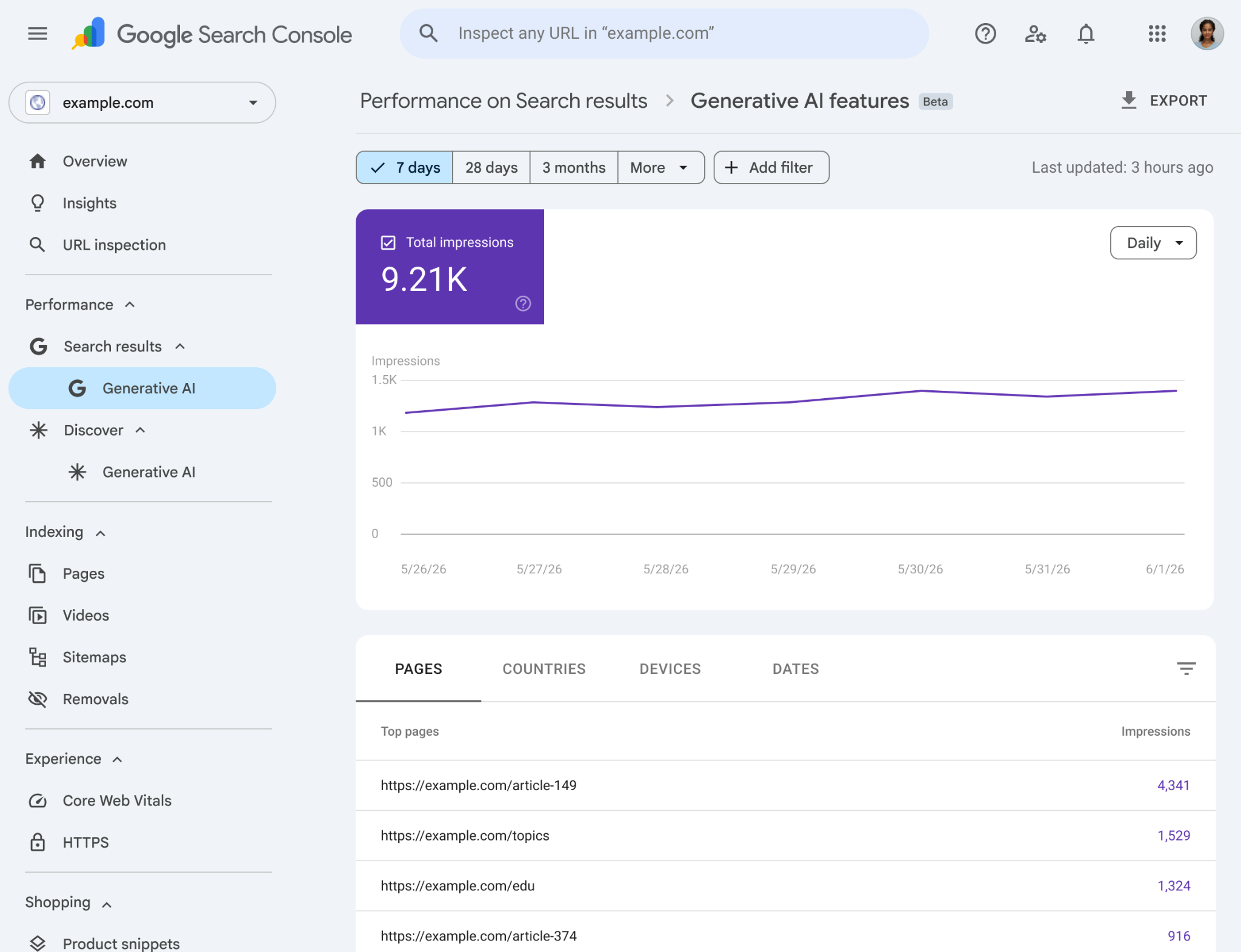
Many business owners now see brand mentions in Google’s AI answers before they see a visit in analytics, which creates a reporting gap that classic SEO dashboards do not explain. When working with Search Generated AI Performance Reports in Google Search Console, you can finally measure visibility inside AI Overviews and related generative surfaces, then connect that exposure to search intent, query performance, and eventual conversion rate outcomes.
I wrote this for Las Vegas businesses and local teams that want practical clarity, not hype. You’ll see what these reports show, how to access the Performance report, how to read the metrics correctly, and how to avoid bad conclusions while Google continues expanding the feature.
What These AI Performance Reports Are (And Why They Matter)
Google’s new reporting for Search Generative AI is designed to show where your content appears inside generative SERP features on Search and Discover, not just in standard blue-link results. That distinction matters because AI visibility can shape brand recall even when the user never takes a classic click.
The core value is measurement of exposure in answer-first search experiences, where your page may influence a decision before traffic appears in GA4. For a local business, that means a service page can affect lead generation upstream, even if the visit happens later through branded search or direct navigation.
These reports are still evolving, and availability may be limited by region, account status, and legal rollout constraints such as the UK CMA process. Early data should be treated like directional intelligence, which is why filters and clean comparisons matter more than dramatic week-to-week reactions.
WFpulse looks at this through a practical lens: visibility is earned, not claimed, and exposure only matters if the page can support the next step. That perspective comes from being specialized in Webflow development with high-level execution and from ongoing Webflow support and maintenance to keep sites evolving as Google changes the rules.
Who Should Care Most
Local and service businesses should care because AI answers often summarize providers before a user reaches a contact page, which can influence lead generation without obvious attribution. Teams focused on Local SEO and broader digital growth to drive visibility and leads need verification in place now so they are ready when access appears.
Publishers and content teams should care because AI surfaces often reward topic clusters and definitional coverage over isolated articles. If your content already builds authority around a subject, this report helps show whether Google is treating that cluster as reference-worthy.
What’s Different vs. Standard Performance Reports
Unlike the standard Search results report, this view isolates generative AI surfaces instead of blending them into classic rankings. That separation is useful because natural language querying changes how users interact with answers, and blended reporting would hide the difference between citation visibility and ordinary clicks.
Some metrics may be delayed, missing, or not directly comparable to traditional Search Console workflows. That limitation is not a flaw in your SEO program by itself; it is a signal that AI search measurement is still catching up to how users actually consume answers.
Accessing the Search-Generated AI Reports in Search Console
If Google has enabled the feature for your property, you will typically find it within Search Console’s performance area as a dedicated AI-related report. The important point is that access depends on rollout, so absence does not automatically mean a setup problem.
Check that you are reviewing the correct property type before interpreting anything. A Domain property usually gives broader coverage than a URL-prefix property, and partial property setup can create false confidence because only part of the site is being measured.
Start with a clean date range before reading trends. I prefer the last 28 days first, because it is long enough to smooth random noise but short enough to catch shifts tied to site changes, rollout expansion, or country-level availability tied to legal frameworks such as the UK CMA rollout.
Prerequisites and Common Access Issues
You need verified ownership and the right permissions to view performance reporting. If your site is on Webflow, verification is still straightforward, but many teams accidentally verify only one version of the site and then wonder why coverage looks incomplete.
Rollout limitations are another common issue. A fully verified property can still lack the report if Google has not enabled it for that account, region, or testing group yet.
Recommended Starting Configuration
Use an AI-powered configuration mindset by setting last 28 days, then compare it with the previous period. Directionality matters more than one-day spikes because generative surfaces can fluctuate as Google tests presentation.
Segment by device and country early. That simple move often reveals that the audience seeing your pages in AI results is not the audience your landing page was built for.
What Metrics You’ll See (And How to Interpret Them)
The most common metric is impressions, which in AI surfaces should be read as exposure rather than traffic intent. If impressions rise while leads stay flat, the report is telling you that Google is surfacing your content, not that your funnel is converting.
You can usually break data down by pages, countries, devices, and dates. Those dimensions matter because visibility patterns often reveal eligibility and formatting strengths, especially when structured data and page clarity help Google extract reliable summaries.
Click data may be absent or not comparable to classic CTR analysis. That means you should not force old query performance habits onto a new surface that often resolves user questions before a click is needed.
Impressions: What They Mean in AI Surfaces
Treat impressions like share of visibility inside AI experiences, not as a direct demand signal. A spike often reflects changing query themes, feature expansion, or broader page eligibility rather than a simple ranking jump.
Pages Shown: Turning Visibility Into Content Priorities
Look closely at which URLs appear most often. If the pages shown do not support your conversion path, you have a content alignment problem, not a visibility problem.
Thin, outdated, or weakly structured pages that receive AI exposure should move to the top of your content refresh queue. AI visibility on the wrong page is still useful because it tells you where Google sees topical relevance first.
Step-by-Step: How to Analyze the Report Like an SEO (Not a Tourist)
Start broad with the sitewide trend, then move to page-level patterns, then segment by country and device. That sequence keeps you from chasing one interesting URL before you understand the larger technical SEO and visibility context.
Build a weekly review rhythm instead of checking daily. AI reporting is noisy, and the teams that win are the ones that connect exposure to assisted conversions, branded demand, and lead quality over time.
Step 1: Establish a Baseline and Watch Trend Direction
Use a stable 28 to 90 day window and note the median daily impression level. Median is more useful than peak because one unusual spike can distort your sense of progress.
Annotate major site changes such as migrations, navigation updates, and template edits. Those notes turn reporting into diagnosis instead of guesswork.
Step 2: Find the Pages Getting AI Visibility
Sort pages by impressions to identify your AI-cited cluster. Then compare those URLs with pages that actually produce form fills, calls, or bookings.
That gap is where strategy lives. If informational pages dominate visibility while service pages drive revenue, you need stronger bridges between education and action.
Step 3: Segment by Country and Device to Spot Eligibility Patterns
Country spikes can come from feature rollout, not from better SEO. If one market suddenly rises, confirm whether Google expanded AI availability there before celebrating a win.
Device splits often expose downstream UX issues. Mobile users may see your content in AI results, but weak readability or layout instability can still suppress conversions after the click.
Practical Examples: What to Do With the Data
If impressions are up but leads are flat, improve the next step on the page before chasing more exposure. Better internal links, clearer service proof, and tighter relevance usually move business outcomes faster than raw visibility growth.
If one location page dominates AI exposure, replicate its structure across similar pages. That often works because Google is responding to a format pattern, not just to the city name.
If informational content gets high AI visibility, add conversion bridges without turning the page into an ad. A useful definition page can still guide users toward a service comparison, estimate request, or local proof point.
Local Business Example: Service + City Pages
If AI visibility clusters on one service page, add supporting FAQs and schema to clarify service area and scope. For local operators, strong business details, credentials, policies, and original photos improve trust signals that AI systems and users both rely on.
For businesses exploring local AI search, I also recommend reviewing how las vegas drug lawyers can win in AI driven local search. The same structural lessons apply well beyond legal marketing.
Publisher Example: Topic Hubs and Refresh Cycles
Use the pages shown report to decide which hub pages deserve updates first. Add citations, definitions, concise subheadings, and cleaner summaries so Google can extract accurate context.
This is also where simple search GPT SEO strategies that actually work becomes relevant. Pages that explain a topic clearly often gain more durable AI visibility than pages that merely repeat keywords.
Limitations, Caveats, and What Not to Conclude
Limited rollout, regional constraints, and interface testing can distort trend interpretation. A drop may reflect feature reduction or UI experimentation, not a penalty or quality collapse.
Because clicks may be missing, classic CTR playbooks do not apply cleanly here. Focus instead on assisted impact, branded search lift, and later-session behavior in GA4.
Attribution remains messy because AI exposure may influence a later branded search, direct visit, or even a phone call after offline comparison. That is why visibility should be treated as one layer of evidence, not the final ROI statement.
Common Misreads We See in Real Reporting
The biggest mistake is treating impressions like traffic and promising revenue from visibility alone. The second mistake is assuming every decline is an SEO failure when Google may simply be reducing the feature’s footprint.
When You Still Need Other Data Sources
Use GA4 to evaluate on-site outcomes and assisted conversion patterns. Use server logs or CDN analytics when diagnosing crawl shifts, rendering issues, or agent behavior behind sudden visibility changes.
AI Blocking Controls: How They Relate to Performance Reporting
Google is also introducing AI Blocking Controls, which are meant to let site owners limit use of their content in AI-generated experiences without changing classic rankings. That makes this a content strategy decision, not just a technical toggle.
The right choice depends on business model, brand risk, and how much of your value depends on page views versus offline or lead-driven conversion. From a WFpulse perspective, and from being a Las Vegas native with deep roots, bringing hands-on experience from owning multiple local Las Vegas businesses, giving me a business-owner’s perspective on SEO and strategy, the decision should be tied to revenue mechanics first.
Track any change with careful before-and-after annotation. Equal comparison windows matter because rollout volatility can make a policy change look more important than it really is.
When Blocking Might Make Sense
Blocking may make sense if AI Mode starts intercepting the exact path that produces your highest-value conversions. It can also fit publishers whose revenue depends heavily on on-site page views or proprietary content access.
When Blocking Can Backfire
Blocking can hurt if top-of-funnel awareness is part of your growth model. If competitors stay eligible while you opt out, they may absorb the AI exposure that used to introduce your brand.
Key Takeaways and a Simple Weekly Workflow
Use AI impressions as a visibility KPI, then validate impact with leads, calls, bookings, branded search trends, and conversion rate changes. That workflow keeps reporting honest because it separates exposure from business value.
My simple weekly process is trend, top pages, segments, then action list. Most actions fall into four buckets: refresh content, expand supporting pages, improve UX, and strengthen internal links.
Keep an experimentation log with dates for template changes, schema edits, and content updates. Combining technical Webflow expertise with results-driven business growth strategies makes these reports more useful because the goal is not more charts; we ensure your site converts, focusing on tangible business outcomes like leads, bookings, or sales.
WFpulse Perspective: Visibility Only Matters If It Converts
We have repeatedly seen that structure and intent alignment drive lead gains faster than chasing every new search feature. Treat this report as a new lens, not a new strategy.
If you need a channel comparison mindset while evaluating AI visibility, google ads and this las vegas digital marketing cost ROI calculator SEO vs google ads vs social provide useful context for measuring where organic exposure fits in the broader mix.
FAQ
How to get generative AI results in Google Search?
You do not turn them on as a site owner. Google shows generative AI features when the query, region, and user experience support them, so your role is to publish clear pages that are eligible to be referenced.
How to track AI Mode in Google Search Console?
If your property has access, use the dedicated AI performance report and segment by page, country, device, and date. That view shows visibility patterns, even when classic click-based analysis is limited.
How do I filter out AI search results on Google?
In Search Console, you usually cannot fully remove AI surfaces from standard reporting unless Google provides a dedicated view. On the user side, Google may offer interface controls, but availability varies by region and experiment.
How to track AI search results?
Use the AI performance report for impressions and pages shown, then pair it with GA4, lead tracking, and branded search trends. That combination gives you a better read on downstream impact than impressions alone.
Google’s AI reporting is still early, but early does not mean unimportant. If you understand what the data actually measures, you can make better decisions now and avoid confusing visibility with value later.