
A Webflow team may know that AI can draft content, yet still wonder whether an agent can inspect a CMS, create an item, or update structured fields directly. When working with Webflow MCP 2.0, the useful question is not what AI can generate, but which Webflow operations an authenticated agent may perform under explicit controls.
The official server connects AI tools with Webflow through MCP resources and approved actions, while technologies such as Node.js, the Webflow JavaScript SDK, and Webflow Data APIs support related integrations. This guide explains the architecture, setup, practical applications, and safeguards behind AI-assisted site updates without treating the agent as a replacement for the Webflow Designer or human judgment.
What Webflow MCP 2.0 Means
Model Context Protocol, or MCP, is a standard through which AI agents can receive structured context and call approved tools. In Webflow, MCP tools can turn a conversational request into a defined API operation governed by authentication and access permissions.
Webflow released MCP 2.0 on July 21, 2026, adding governance features, deeper component support, and page branching for AI agents. The server acts as an interface between AI tools and Webflow APIs, not as an autonomous website builder capable of making unrestricted design or business decisions.
Human review remains responsible for permissions, source accuracy, publishing, and customer-facing claims. At WFpulse, we combine technical Webflow expertise with results-driven business growth strategy, which means evaluating whether automation contributes to leads, bookings, or sales rather than measuring success by update volume.
With MCP 2.0, the Webflow MCP Bridge App is no longer required for most use cases. Regardless of the installation path, teams should still inspect scopes, tool definitions, and approval controls.
Why MCP Is Different From a Standard AI Chat
A standard chat can explain how to create a CMS item, while an MCP-enabled agent can use Webflow's CMS item creation tools to create a staged draft with collections_items_create_item or create and publish an item with collections_items_create_item_live. OAuth, tool boundaries, and underlying API coverage determine whether the requested action is authorized, supported, or rejected.
How the Webflow MCP Server Works
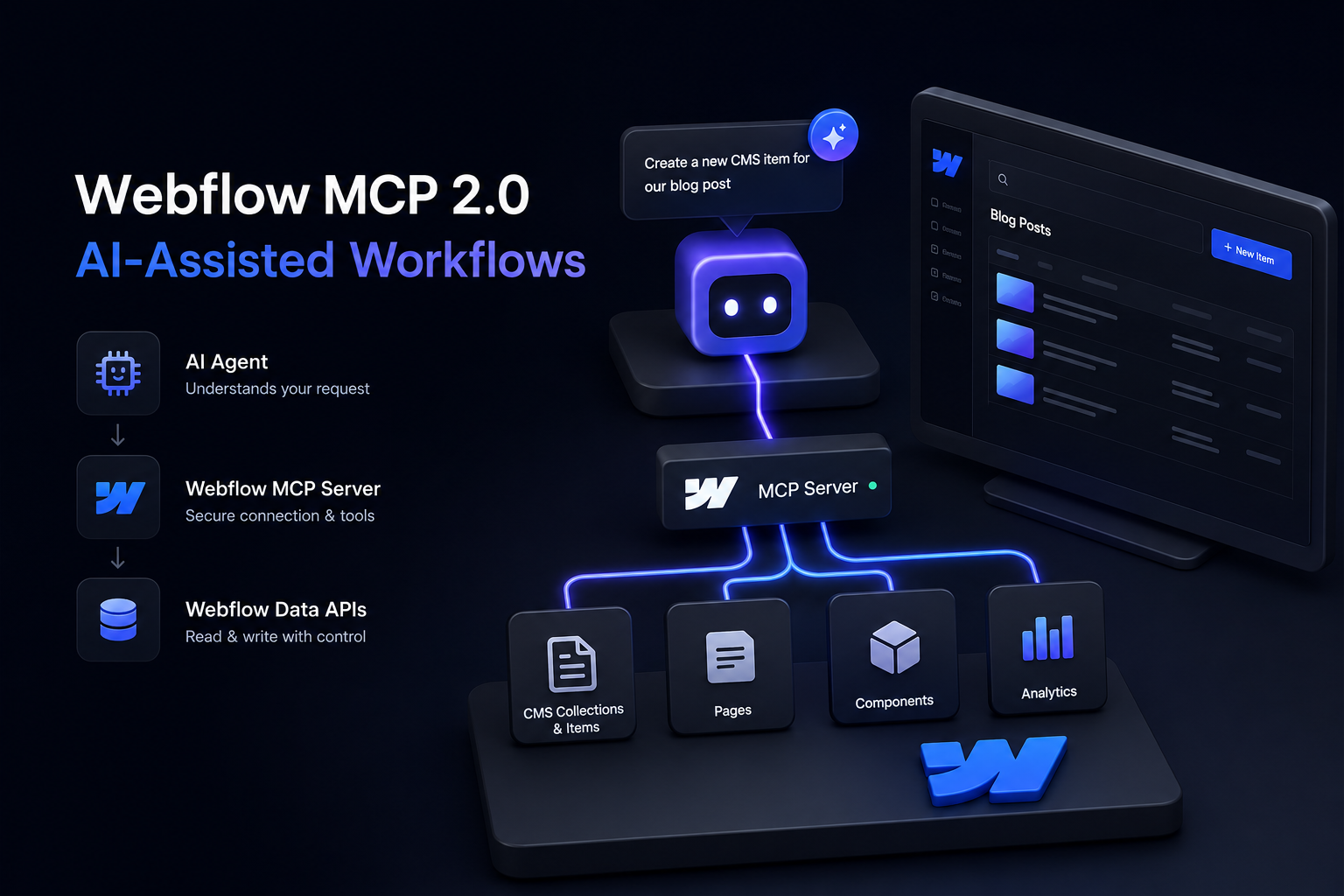
A typical workflow connects an MCP client to the Webflow MCP server, passes authorization through an authentication layer, and directs structured calls to Webflow Data APIs for a selected site. The agent interprets a request, chooses an exposed tool, supplies the required parameters, and returns the API result for review.
Read actions can list sites, pages, or collections without changing stored content. Write actions, including CMS generation or page-data updates, carry greater operational risk because an incorrect field mapping can affect many records.
Webflow's official MCP server is remotely hosted at https://mcp.webflow.com/mcp. Teams pursuing custom or local development can create a custom server from the official Webflow MCP server source code and use a Webflow MCP Bridge App where that workflow requires it.
The Role of Resources, Tools, and Agent Instructions
Agent Instructions is now a named Webflow feature that centralizes context such as design-system resources, CMS content, brand voice, and legal documents in one place. It works with both Webflow AI and third-party agents connected through the Webflow MCP server.
MCP resources provide context such as schemas or structured data, while tools expose narrowly defined operations. Agent instructions should establish content governance, naming conventions, approved sources, validation rules, prohibited actions, and mandatory review stages before tools are called.
What the Server Can Access
The Webflow MCP server provides tools for sites, CMS collections and items, pages, components, and analytics or activity data. It does not provide a dedicated forms tool, although forms can be created as elements through the Designer API.
Ongoing Webflow support and maintenance remains necessary because API-driven changes do not independently assess visual presentation, conversion behavior, or architectural quality. A successful tool response confirms execution, not business correctness.
Set Up a Controlled Webflow MCP Workflow
Start with a Webflow account that has appropriate site access, an MCP-compatible client, and a named team owner for configuration and approvals. Follow Webflow's current installation instructions instead of copying old configuration snippets, which may reference obsolete packages, endpoints, or authentication methods.
Grant only the permissions required for the defined workflow, and keep credentials out of prompts, repositories, screenshots, and shared documents. Least-privilege access limits the damage caused by an incorrect instruction or exposed token, especially in a production environment.
Run the first tests against a staging site or noncritical collection. MCP 2.0 lets agents build on branches, an isolated environment separate from the live site, which strengthens the staging-before-production approach. Production access should follow demonstrated validation, documented rollback procedures, and successful tests using representative content.
Build a Small First Test
Ask the agent to list collections, inspect several items, and summarize field requirements before authorizing a write. A useful reversible test creates one draft CMS item, validates each field and reference, and then deletes the record.
Document Your Guardrails
Specify which collections, locales, page types, and fields the agent may change. Require review for URL slugs, meta descriptions, SEO titles, redirect mapping, publishing, and factual claims.
Programmatic SEO needs additional controls for templates, canonical behavior, indexation, and source uniqueness. Local SEO and broader digital growth can increase visibility and leads only when scaled pages satisfy distinct search intent rather than repeat interchangeable copy.
Use Cases That Deliver Real Operational Value
The Webflow MCP server can audit CMS completeness, identify missing required fields, and report inconsistent formatting across large collections. This read-first application reduces editorial inspection time without exposing production data to unnecessary write operations.
Agents can also create structured drafts from approved source data for location pages, resource hubs, product catalogs, and event listings. Draft creation is more defensible than automatic publishing because editors can verify facts, field relationships, and search intent before release.
For multi-location businesses, controlled templates can maintain consistent architecture without blindly duplicating content. As a Las Vegas native with deep roots and experience owning multiple local Las Vegas businesses, I view location content through a business owner's perspective: every page should reflect actual services, customers, and local conditions.
Example: Drafting a Local Service Page
Provide an approved service, location, differentiators, and schema-ready business facts, then instruct the agent to create a draft. Review local relevance, internal links, URL format, conversion copy, and duplication risk before publishing.
Example: CMS Quality Control
Ask the agent to identify items missing alt text, summaries, categories, author data, or SEO fields. Convert the report into an editorial queue, and spot-check field mappings before approving bulk changes.
Agents can also retrieve page and collection context to accelerate integration troubleshooting and content-architecture validation. Faster retrieval matters because it lets developers distinguish a data-model problem from a client, authentication, or API problem earlier.
Limitations, Risks, and Common Mistakes
Do not assume an MCP agent can manipulate every feature available in the Webflow Designer. Its practical capabilities depend on exposed tools, authorization scopes, current API coverage, and the selected site configuration.
Broad production permissions may accelerate testing, but they also allow mistakes to scale across CMS records. AI-generated content still requires factual, brand, legal, and SEO review because successful API execution does not verify truth or suitability.
Workflow design must account for stale source data, incomplete context, failed tool calls, and Webflow Data API rate limits of 60 requests per minute for Starter and Basic plans and 120 requests per minute for CMS, eCommerce, and Business plans. When a limit is exceeded, the API returns HTTP 429 with a Retry-After header that retry logic should respect.
Mistakes That Create SEO Problems
Thin, near-duplicate location or service pages can consume crawl resources without adding distinct search value. Unreviewed slug changes, faulty canonical tags, missing redirects, and broken collection references can also damage established rankings and indexation.
Mistakes That Create Content Problems
An agent may infer unsupported pricing, availability, qualifications, or service areas when source material is incomplete. Require source-backed fields and define a fallback such as "leave blank and flag for review" whenever evidence is unavailable.
A Practical Operating Model for Teams
Treat Webflow MCP as one component of a documented content and development system, with named owners for inputs, approvals, publishing, and rollback. Teams specialized in Webflow development with high-level execution still need accountable processes because technical access does not resolve editorial ownership.
Begin with read-only audits, progress to draft creation, and allow limited updates only after validation becomes repeatable. This staged model reveals schema and instruction problems before they reach customer-facing pages.
Measure time saved, error rate, draft acceptance, indexation quality, and conversion performance rather than counting tool calls. A change log should record requests, actions, results, reviewers, and rollbacks so the team can improve prompts, data models, and operating rules. MCP 2.0 also tracks MCP actions in Webflow's site activity logs, recording when a change was made, who triggered it, and what was affected. The activity log can be queried through MCP, but teams still own the review and rollback decisions the log informs.
Key Takeaway
The value of Webflow MCP does not come from asking AI to run a website unattended. It comes from connecting AI to structured Webflow operations through permissioned, reviewable workflows in which CMS architecture and editorial control receive the same attention as automation.
A disciplined Webflow MCP workflow turns automation into an accountable operating layer rather than an uncontrolled content engine. Visibility is earned through accurate information, sound architecture, and consistent review, not through the volume of pages an agent can produce.