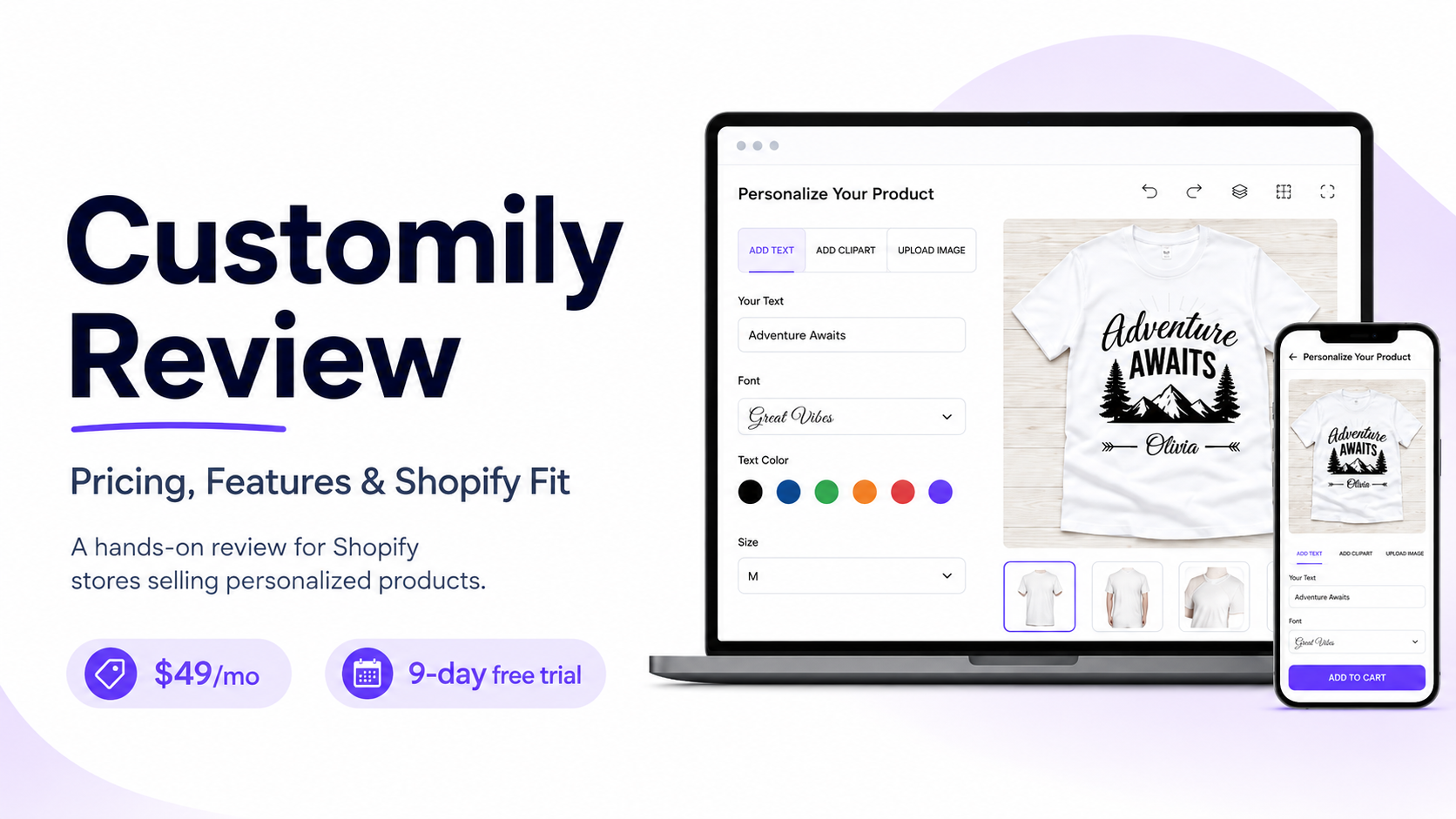
Quick verdict: I have used Customily to set up product templates, create layouts, configure conditional logic, upload custom fonts, connect it with Shopify, add pricing upcharges, and use masking. It costs $49 per month, plus a per-item transaction fee of $0.10 to $1, and includes a 9-day free trial. I recommend it for Shopify stores selling personalized products when live previews, print-ready files, and order automation can save more labor than the setup and template maintenance require.
This is a first-hand Customily review informed by my own product setup experience, current public product documentation, Shopify App Store information, and user feedback.
Customily at a Glance
Customily Product Personalizer is built for Shopify merchants selling personalized products and other custom products. Shoppers can enter custom text, upload images, make font selections, and select design options while viewing a live product preview before checkout.
I used Customily to build product templates and layouts, apply conditional logic, upload custom fonts, configure Shopify integration, set pricing upcharges, and use masking. Those capabilities make it relevant for print-on-demand merchandise, custom gifts, apparel, home decor, jewelry, and other products that require customer input before production.
It is a direct consideration alongside Teeinblue, Podifai, Printify Personalization Hub, and a manual personalization workflow.
Pros and Cons
Pros
- Live product previews help customers see personalization choices before ordering.
- Supports common personalization inputs such as text, font selection, colors, clipart, product templates, image uploads, masking, and product options.
- Conditional logic and pricing upcharges give merchants more control over complex product configurations.
- Automates the handoff of personalization data and artwork into a production workflow, supporting order automation and print-ready files.
- The team is responsive and supportive. When I raised an issue or needed help with a unique setup, Customily worked to resolve it and involved the development team when needed.
- Built specifically for Shopify stores selling customizable products.
- Shopify App Store listing shows a 4.8-star review rating from 257 user reviews, checked August 7, 2026.
Cons
- Building out templates takes time to learn because the interface and the role of each feature are not immediately intuitive.
- Template creation, testing, and ongoing maintenance take real time.
- Complex artwork, conditional choices, multiple print areas, masking, and customer image uploads increase implementation risk.
- The app is centered on Shopify, so merchants using another ecommerce platform need a different solution.
- Customily does not replace order management, fulfillment operations, or quality control.
- Subscription pricing and per-item transaction fees need to be evaluated against expected order volume.
Customily Pricing
Pricing verified August 7, 2026. Customily publishes one Shopify plan rather than a tiered set of pricing plans. The official pricing information does not state an included monthly order limit. Instead, the app uses a monthly subscription plus a transaction fee per order item.
| Plan | Monthly price | Order limits and fees | Free trial |
|---|---|---|---|
| Customily Plan | $49 per month | No published monthly order cap. Transaction fees range from $0.10 to $1 per order item. | 9 days, with full access and no transaction fees during the trial. |
The subscription is not the whole cost. The total investment also includes product-template design, catalog configuration, quality assurance, team training, customer support time, and any outside design help needed for complex production artwork.
Before committing, calculate the monthly app fee and per-item fees against the manual artwork time the app removes. The economics are strongest when the workflow produces accurate previews and usable print-ready files at enough volume to reduce repetitive work.
Features That Matter for Personalized Product Stores
Customily centers on a customer-facing product customizer that connects personalization fields to a visual preview and production output. Depending on the product setup, merchants can offer text customization, font selection, colors, clipart, design templates, image uploads, masking, and selectable product options.
In my experience, the strength is the amount of control available when building a product setup. I used product templates and layouts, conditional logic, custom font uploads, Shopify integration, pricing upcharges, and masking to create more tailored personalization experiences.
For custom apparel, gifts, or print-on-demand products, the practical value comes from turning approved customer selections into order data and print-ready files. That only works when product templates match actual print areas, resolution requirements, product variants, and fulfillment rules.
Live Preview and Customer Experience
Live preview is the core customer-facing benefit. It reduces uncertainty by showing shoppers what their configured product should look like before they place a made-to-order order.
Preview quality needs to be tested on mobile and desktop. Mobile UX matters because a difficult template editor or unclear personalization flow can create customer drop-off before checkout. Merchants should test the full path from the product page to cart, checkout, order confirmation, and production file. A preview can look correct while the order data or output file still creates production ambiguity.
A clear, conversion-focused design can help customers complete personalization with less uncertainty, but conversion rate gains depend on the product, traffic quality, pricing, and the reliability of the finished preview.
Production and Fulfillment Workflow
Customily can reduce manual artwork preparation by creating a structured personalization workflow and supporting order automation. Before expanding a catalog or increasing traffic, validate dimensions, color settings, file naming, print specifications, and the requirements of the actual print provider.
Setup and Template Maintenance
Setup complexity is the main operational trade-off. I found that building out the system takes time to get used to because the UI and the purpose of each feature need to be learned. Once you understand how the pieces work together, the available controls make it possible to build more specific product experiences.
A product that only needs a name and date is much faster to configure than a product with layered artwork, customer photos, conditional choices, masking, multiple print areas, or many variants.
Template maintenance continues after launch. New designs, product changes, print-specification updates, and catalog expansion all require testing. Start with one representative product, place test orders, confirm production accuracy, and then expand the workflow.
Customily Limitations to Understand Before Installing
Customily is a Shopify-focused product-personalization solution. Stores that sell primarily outside Shopify need to confirm whether the app integration fits their platform and operating model before building around it.
It also does not solve order management or fulfillment on its own. Merchants still need a reliable process for inventory, production scheduling, customer service, shipping, returns, and quality control.
Complex artwork raises the stakes. Customer photo uploads, detailed layered templates, conditional logic, masking, and multiple print zones can produce edge cases that demand careful testing. The tool can automate a repeatable workflow, but it cannot remove the need to define that workflow correctly.
Customily Comparison: Features and Fit
| Factor | Customily | Teeinblue | Podifai | Manual workflow |
|---|---|---|---|---|
| Live preview | Core feature for configured products | Live personalization preview for Shopify stores | Real-time preview for Shopify product customization | Absent unless staff manually creates proofs |
| Text and image personalization | Supports configurable text, images, font selection, masking, and design choices | Supports personalized designs for gifting and print-on-demand workflows | Supports text, image uploads, conditional logic, and dynamic pricing | Collected through forms, notes, or customer messages |
| Production workflow | Connects personalization setup to print-ready output | Designed for template-based personalization workflows | Designed for configurable Shopify product workflows | Staff creates artwork and production files manually |
| Shopify fit | Primary platform | Shopify-focused | Shopify-focused | Works on any platform, but without product-personalization automation |
| Setup load | Moderate to high for complex catalogs | Moderate to high for design-heavy catalogs | Moderate, with complexity rising with conditional logic and variants | Low initial software setup, high ongoing labor |
| Best fit | Stores that need live previews and repeatable production output | Personalized-gift and design-heavy print-on-demand catalogs | Sellers needing live customization, conditional logic, and dynamic pricing | Low-volume validation before investing in automation |
Customily is the better fit when the business needs a mature Shopify-centered personalization workflow with live preview and production output. A manual process remains practical for low order volume or early product validation, but it becomes labor-intensive as orders and design combinations increase.
What Users Like and Where Friction Appears
Customily's Shopify App Store listing showed a 4.8-star review rating from 257 user reviews when checked on August 7, 2026. Recent feedback most often highlights customization flexibility, the live-preview experience, and the app's ability to support complex personalized-product workflows.
My experience matches the support theme. The team has been responsive and supportive when I have had issues or concerns. For unique setups, they have worked to create a solution and involved the development team when the request required deeper technical help.
The recurring friction is implementation complexity. I needed time to understand the template editor, UI, and what each feature was designed to do before building efficiently. Merchants also need to configure product templates accurately and align output files with real production requirements. Subscription pricing matters for stores with enough order volume for per-item transaction fees to become meaningful.
Customer support is part of the buying decision because template and production issues can delay customer orders. Use the 9-day trial to build a real product, ask a configuration question, and place a test order before committing.
This review uses the Shopify App Store review rating because it is the marketplace where Customily is installed. Trustpilot, Reputon, Software Advice, and SourceForge are separate review platforms, but no rating from those platforms is presented here without current, product-specific verification.
When Customily Is the Right Choice
Customily is a strong option when personalization is central to the store's offer and customers need to see their choices before checkout. It becomes more valuable when one product configuration reliably produces accurate order data and reusable production assets.
It fits three common situations:
- A growing print-on-demand shop that needs customer inputs converted into repeatable artwork.
- A high-SKU custom gift brand prepared to maintain templates, product rules, and quality checks.
- A new personalization seller testing a representative product before automating the rest of the catalog.
Choose an alternative when a specific fulfillment-provider ecosystem, lower setup complexity, a different ecommerce platform, or a specialized product feature matters more than Customily's production workflow.
Final Verdict: Is Customily Worth It?
Customily is worth serious consideration for Shopify stores selling personalized products at a volume where manual proofing and artwork preparation are becoming a bottleneck. Its $49 monthly plan, 9-day free trial, and $0.10 to $1 per-item transaction fee make it straightforward to test, but the decision should rest on production accuracy rather than the preview alone.
My hands-on experience shows that Customily is capable of handling detailed setups, including template and layout creation, conditional logic, custom fonts, pricing upcharges, masking, and Shopify integration. It takes time to learn the UI and feature set, but the responsive support team helps when a setup becomes more technical or unusual.
Use the trial to build one representative product, not a simplified demo. Test desktop and mobile customization, place orders, inspect confirmation emails and production files, and compare the complete workflow with Teeinblue or Podifai before rolling the app across the catalog.